Tax File App Help Center home page Help Center
Submit a request
  • Tax File App

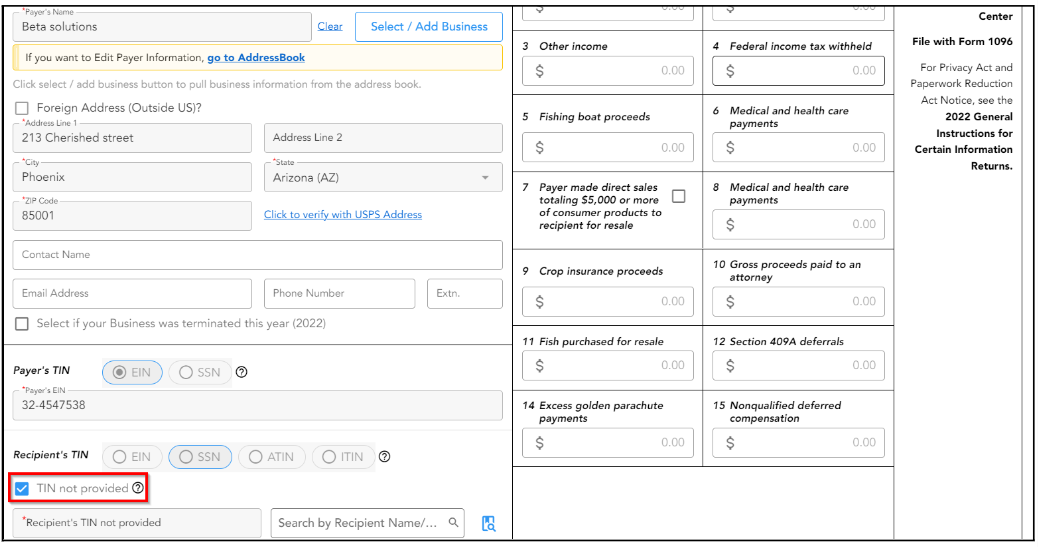
I don't know the Vendor's EIN/SSN. How can I e-file 1099-MISC with Tax File App?

If you don't know the Vendor's TIN, you can select "TIN not provided" under the Recipient’s TIN and proceed to file.  Once you receive the correct TIN from the vendor, you can file a 1099/1098 correction.
Related articles

  • I don’t have the TIN of my Employee/Recipient. Can I file for this recipient?
  • How do I File Corrections or Void Forms?
  • How to File Form 1099-MISC with Tax File App?
  • How do you enable postal mailing services after transmitting forms?
  • How do I void a 1099 that was filed?

Articles in this section

  • How to File Form 1099-MISC with Tax File App?
  • When should I use Form 1099-MISC?
  • I don't know the Vendor's EIN/SSN. How can I e-file 1099-MISC with Tax File App?
  • What are the 1099-MISC filing penalties?
  • Where do I report non-employee compensation in 1099-MISC?
  • What is the difference between 1099-MISC and 1099-NEC?
  • What should I do if I filed Form 1099-MISC instead of Form 1099-NEC?
  • How do I change the vendor's information after importing from Xero or QuickBooks?
  • Why my QuickBook vendor is not showing after I connect to my account?
Register Download YouTube
Powered by Zendesk